


How to Start a Web-Based Live?
If this is your first time trying live streaming or you want to avoid dealing with complex software setups, web-based live is the easiest option.
No downloads are required—just use Google Chrome to quickly go live. It’s simple, easy to get started, and offers low latency and high stability for a smoother live experience.
Complete Live Setup Process
- Submit a Live Stream Application
First, submit a live stream application. Select [PC] as the streaming device. The system will default to [Go live via web]. - Enter the Live Room
After the application is approved, go to [Live Record] and click the live stream cover to enter the live room directly. - Start Streaming and Authorizing Devices
Click [Go Live]. For your first stream, the system will request microphone access. When prompted, click [Allow]. - Configure and Go Live
Once in the live streaming page, turn on the [Microphone] (supports built-in or external microphones). Use [Screen Sharing] to select a browser window or your entire screen. You can then start streaming and presenting normally. - End Streaming and Handle Exceptions
The [End Live] button is located on the far right of the live page. To prevent accidental actions, ending a stream requires a second confirmation.
If the stream is interrupted due to network issues, you can re-enter the live room and resume streaming within 10 minutes without submitting a new application.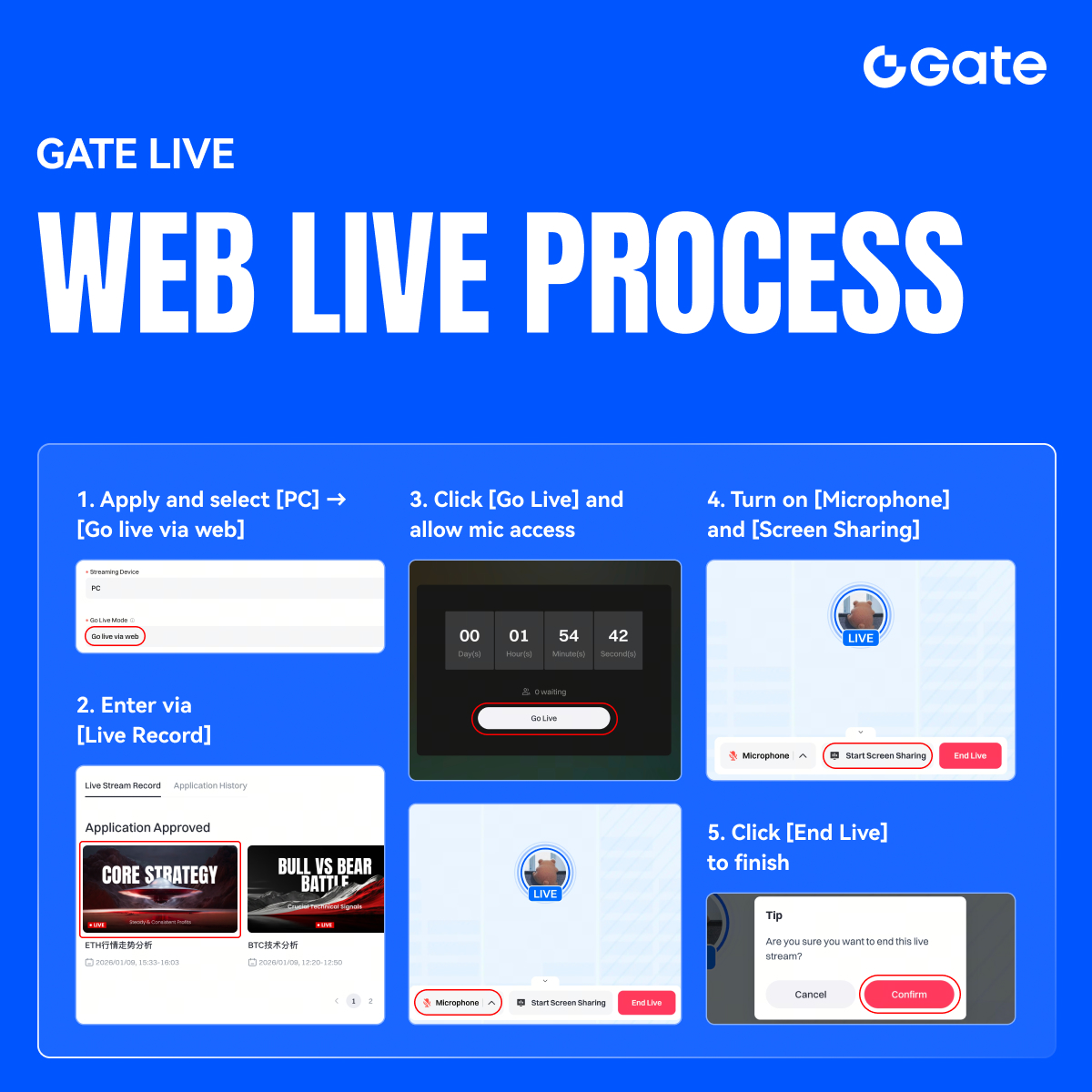
Disclaimer
The content provided herein is for reference and educational purposes only and does not constitute any financial, investment, trading, or legal advice, nor does it constitute an offer or solicitation to buy or sell any digital assets. Gate makes no express or implied representations or warranties regarding the accuracy, completeness, or timeliness of the information contained herein. Product features, interfaces, rules, and fee structures may be updated or adjusted at any time. Please refer to the latest announcements and the actual information displayed on the Gate platform for the most accurate details.
Digital asset investments involve significant risk, and prices may fluctuate substantially. You may lose the entire amount of your investment. Please make decisions cautiously based on your own financial situation and risk tolerance after fully understanding the associated risks. If necessary, you are advised to consult an independent professional financial or legal advisor.
For more information about potential risks, please refer to Gate's Risk Disclosure and User Agreement.
