


إدارة الحسابات الفرعية للمنتجات
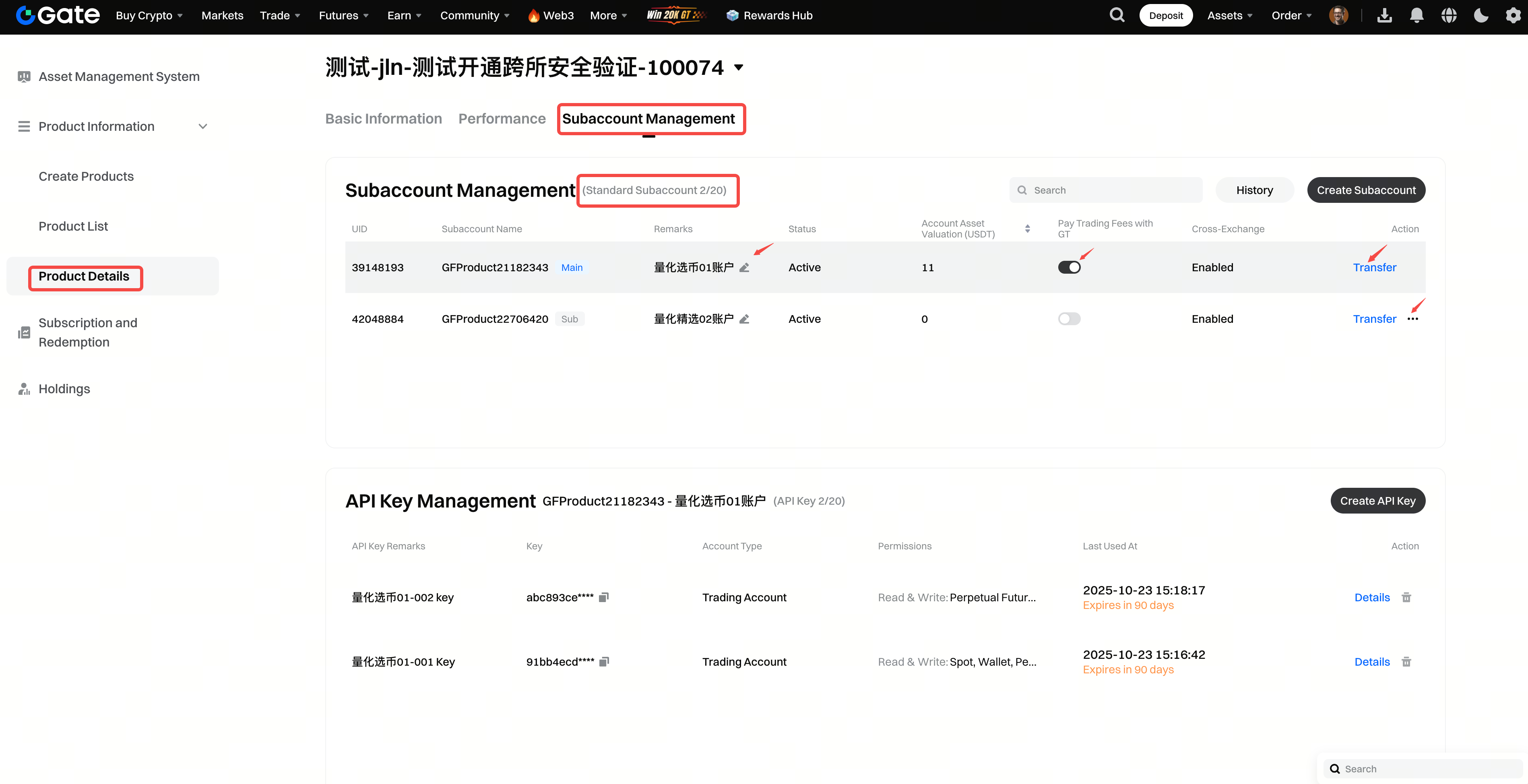
في علامة التبويب [تفاصيل المنتج] - [إدارة الحسابات الفرعية]، يمكنك عرض معلومات الحسابات الفرعية لكل منتج (بحد أقصى 20 حسابًا فرعيًا لكل منتج). يمكنك إنشاء حسابات فرعية جديدة، ونقل الأموال، وتمكين وظائف التداول بين الأسواق، وتجميد أو إلغاء تجميد الحسابات الفرعية، وكذلك تمكين أو تعطيل خيار استخدام GT لخصم الرسوم.
نقل الأموال بين الحسابات الفرعية
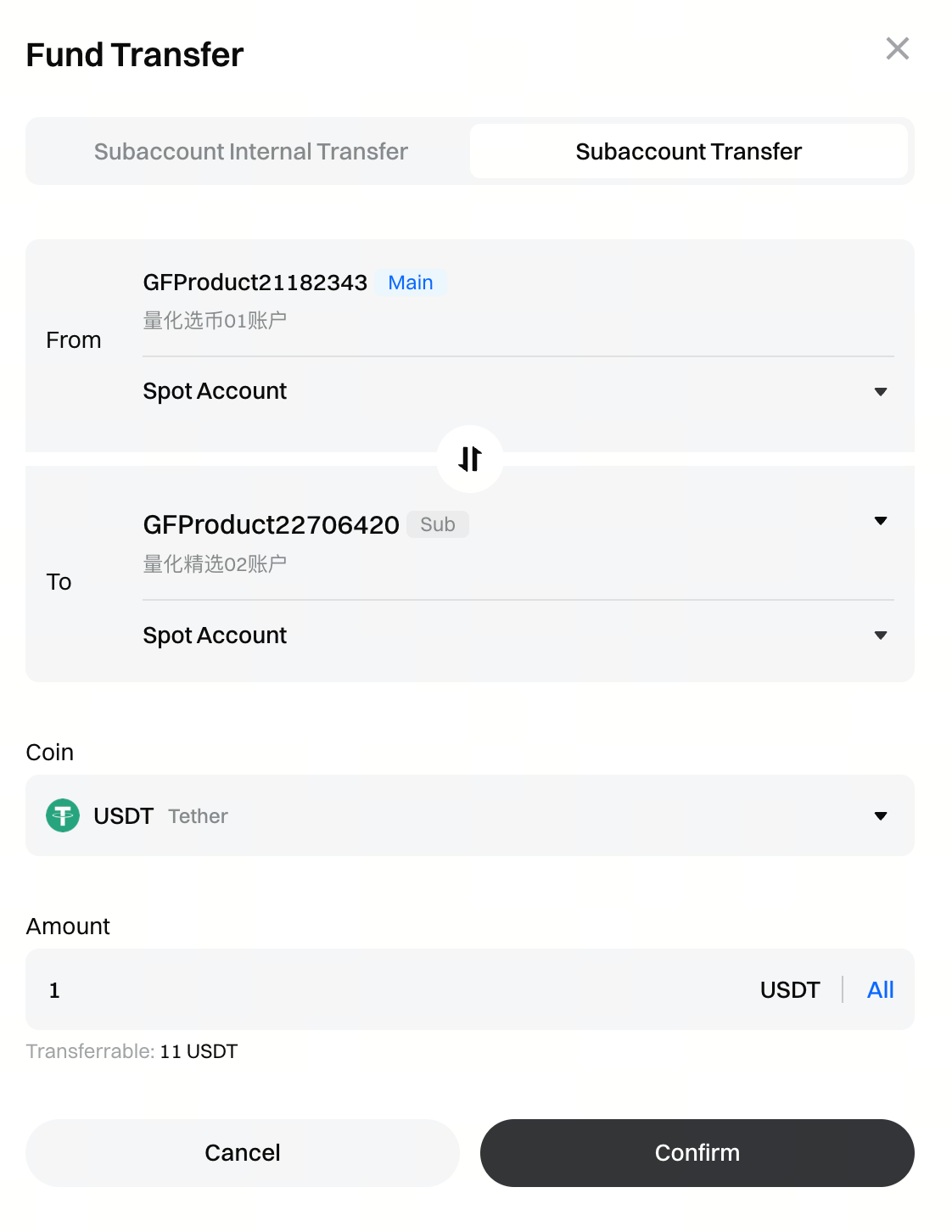
تقوم منصة إدارة الأصول افتراضيًا بنقل الأموال المُجمَّعة إلى الحساب الفرعي الرئيسي للمنتج. في صفحة [إدارة الحسابات الفرعية]، يمكنك تحديد الحساب الفرعي المعني والنقر على [نقل] في لوحة العمليات لتمكين نقلات الأموال الداخلية والنقلات بين الحسابات الفرعية، مما يساعدك على إدارة الأموال وعزل المخاطر داخل المنتج بشكل أكثر فعالية.
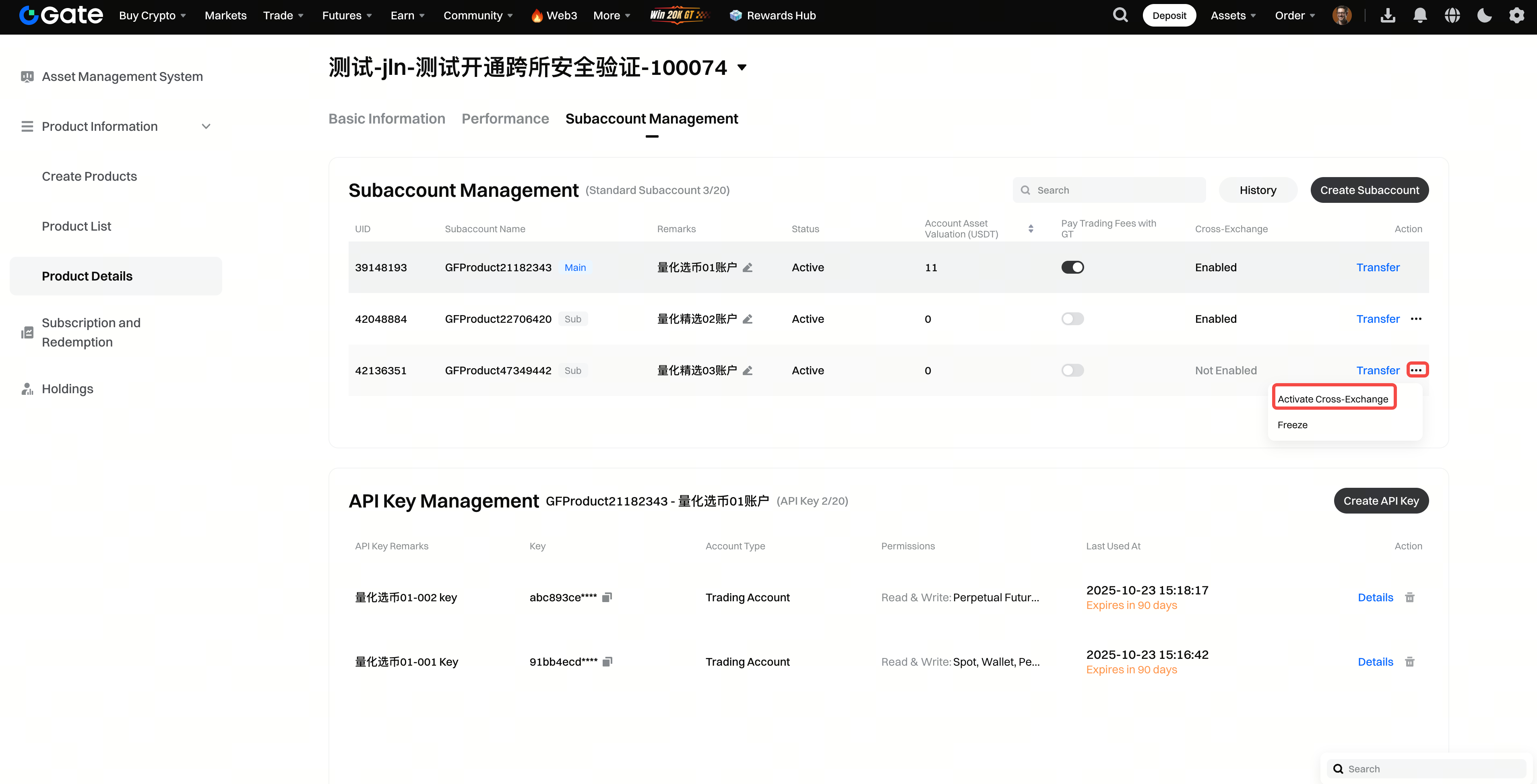
تفعيل التداول بين الأسواق للحسابات الفرعية
الخطوة 1: في صفحة [إدارة الحسابات الفرعية]، حدِّد الحساب الفرعي المطلوب، وانقر على […] في لوحة العمليات، ثم اختر [تفعيل التداول بين الأسواق]. بعد التفعيل، سيقوم النظام بإنشاء حساب تداول بين الأسواق للحساب الفرعي تلقائيًا. بعد التفعيل، سيقوم النظام بإنشاء حساب تداول بين الأسواق للحساب الفرعي تلقائيًا. يدعم التداول بين الأسواق عدة منصات تداول، بما في ذلك Binance وOKX وGate، وذلك لتداول **السوق الفوري والعقود الدائمة المقومة بـUSDT(CrossEx). )).
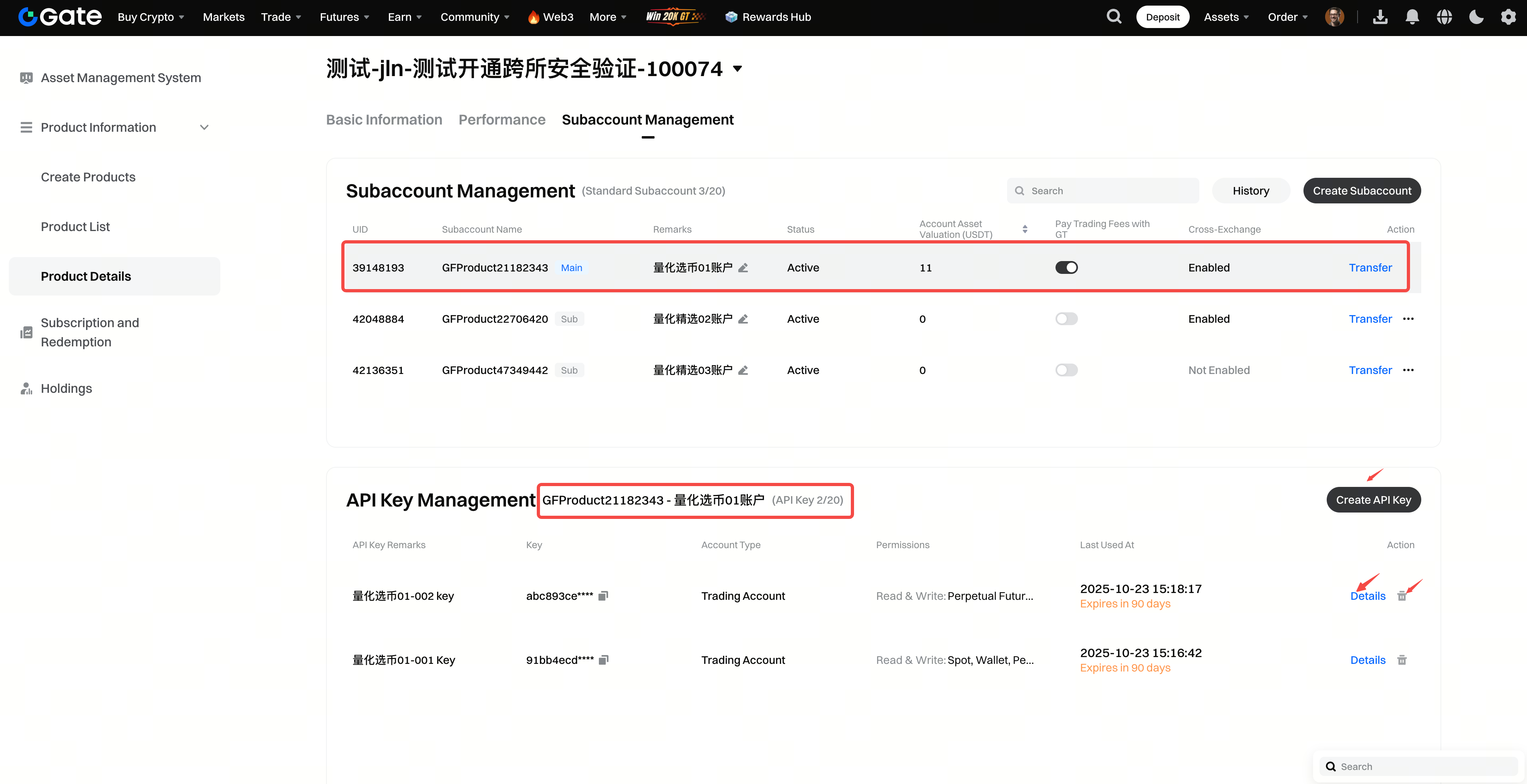
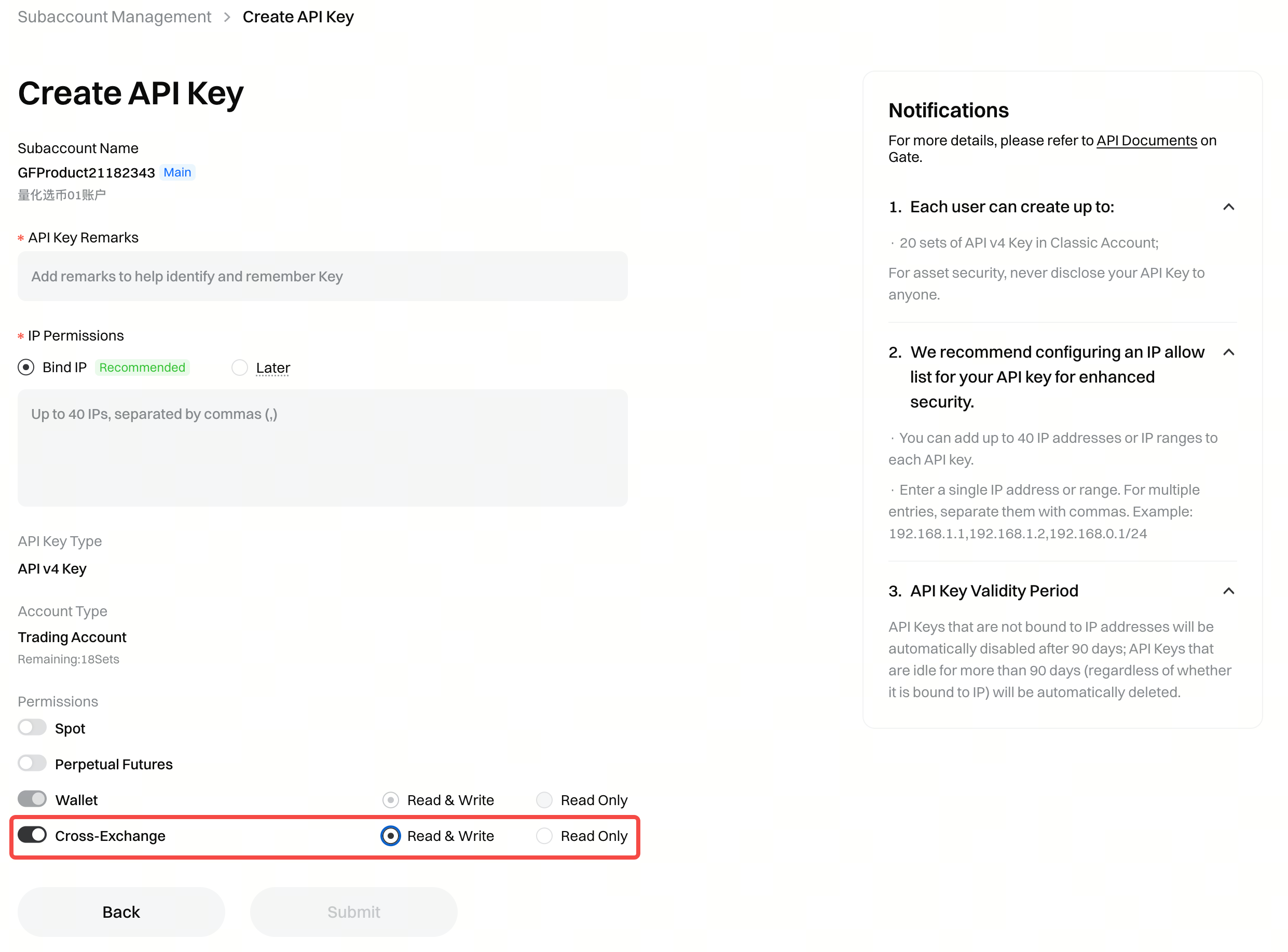
الخطوة 2: في صفحة [إدارة الحسابات الفرعية]، حدِّد الحساب الفرعي المعني، وستُعرض معلومات مفاتيح API (بحد أقصى 20 مفتاح API لكل حساب فرعي). يمكنك إنشاء مفاتيح API أو تعديلها أو حذفها لتنفيذ الاستثمارات عبر واجهة البرمجة.
الخطوة 3: في حال تفعيل وظيفة التداول بين الأسواق، يمكنك تعيين أذونات التداول بين الأسواق لمفتاح API (بدون تفعيل هذه الوظيفة، لا يمكن استخدام مفتاح API للتداول بين الأسواق).
المحتوى الوارد هنا مُقدَّم لأغراض مرجعية وتعليمية فقط، ولا يشكّل أي نصيحة مالية أو استثمارية أو تداولية أو قانونية، كما لا يُعد عرضًا أو دعوة لشراء أو بيع أي أصول رقمية. لا تقدّم Gate أي تعهدات أو ضمانات صريحة أو ضمنية بشأن دقة المعلومات الواردة هنا أو اكتمالها أو توقيتها. قد يتم تحديث أو تعديل ميزات المنتجات والواجهات والقواعد وهياكل الرسوم في أي وقت. يرجى الرجوع إلى أحدث الإعلانات والمعلومات الفعلية المعروضة على منصة Gate للحصول على أدق التفاصيل.
تنطوي الاستثمارات في الأصول الرقمية على مخاطر كبيرة، وقد تتقلب الأسعار بشكل ملحوظ. وقد تفقد كامل مبلغ استثمارك. يرجى اتخاذ قراراتك بحذر بناءً على وضعك المالي وقدرتك على تحمّل المخاطر بعد الفهم الكامل للمخاطر المرتبطة بذلك. وإذا لزم الأمر، يُنصح باستشارة مستشار مالي أو قانوني مستقل.
لمزيد من المعلومات حول المخاطر المحتملة، يرجى الرجوع إلى إفصاح المخاطر واتفاقية المستخدم الخاصة بـGate.
